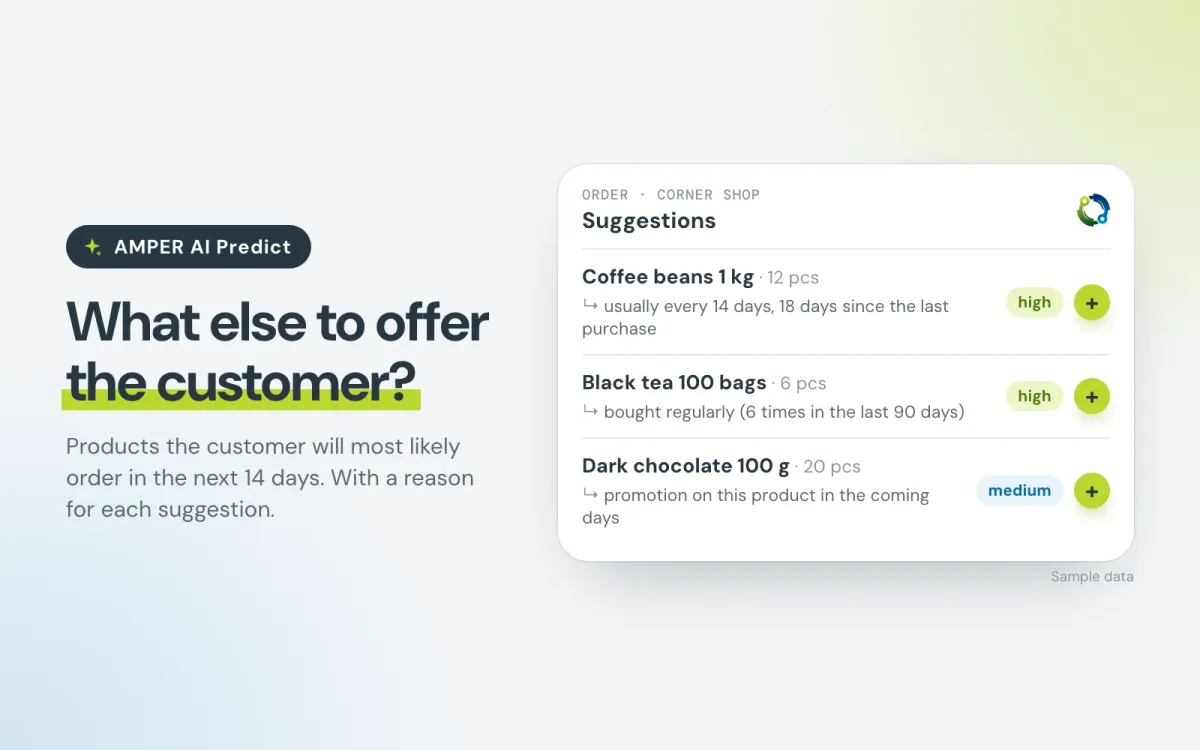
AMPER AI Predict – the sales rep sees what the customer will most likely order in the next 14 days
AMPER AI Predict shows sales reps in AMPER MOBILE which products a customer is most likely to order in the next 14 days. On every document, with a reason for each.
How do your sales reps know today what else to offer a customer when taking an order?
Usually they scroll through the order history or rely on memory: this shop takes coffee roughly every two weeks, I think. With dozens of customers on the route and hundreds of products in the offer, it’s easy to miss something.
A product nobody asks about rarely ends up in the order.
That’s why AMPER AI Predict now works in AMPER. On every document in the AMPER MOBILE app, it shows the sales rep which products the customer is most likely to order in the next 14 days. Every suggestion comes with a reason.
In short
- Suggestions on every document. The rep adds a product to the document with one tap, with a suggested quantity.
- A reason for every suggestion, e.g. “usually every 14 days, 18 days since the last purchase”.
- Only what can be sold today: products with a price for the customer, in stock and visible in the offer.
- It learns only from your company’s data. Each company has its own model.
- A person decides. A suggestion never goes into an order on its own.
1. Where the sales rep sees suggestions
In the AMPER MOBILE app, suggestions appear in three places:
- “Usually orders” – in the visit details: products the customer is most likely to order now.
- “Suggestions” – in the basket of every document: the full list with a suggested quantity. You add a product to the document with one tap.
- “Worth offering” – a few products the customer doesn’t buy yet but might find useful. These are conversation starters and are never added to the order automatically.
We show the chance of purchase in words: high or medium. Suggestions with a low chance don’t appear at all, so the list stays short.
The AMPER AI assistant knows the suggestions too. Just ask: “what should I offer customer X at tomorrow’s visit?” or “how accurate are the suggestions?”.
2. Every suggestion says why
The sales rep doesn’t get a black box. Every suggestion has a short explanation that makes it easy to start a conversation with the customer:
- “usually every 14 days, 18 days since the last purchase”
- “bought regularly (6 times in the last 90 days)”
- “promotion on this product in the coming days”
- “usually bought at this time of year”
- “buying more and more”
For products the customer doesn’t buy yet, the reason reads e.g. “bought by 12 of the 50 customers with the most similar purchases” or “often bought together with ‘Coffee beans 1 kg’, which the customer already buys”.
3. Where the suggestions come from
AMPER AI Predict uses the sales history that is already in AMPER: orders from customers and sales reps, invoices and receipts from the ERP, corrections and returns, visits and visit plans, promotions and stock levels. An order and the invoice issued for it count as one purchase, not two.
For every customer and every product that customer bought in the last year, the system looks at:
- buying rhythm – how often the customer usually buys the product and how long it has been since the last purchase,
- frequency – how many times they bought it in recent months,
- trend – whether they are buying more and more,
- season – whether they usually buy it at this time of year,
- visits – whether a sales rep will visit them in the coming days,
- promotions – whether the product is on promotion.
From this it calculates the chance of a purchase within 14 days and ranks the products from most to least likely. Finally, it drops products that can’t be sold today: without a price for the customer, out of stock or withdrawn from the offer. So the rep doesn’t offer something you can’t deliver.
There’s no need to wait for the system to “collect” data. It learns from the sales history of recent years that is already in AMPER.
4. Learning that can’t make suggestions worse
Right after it is switched on, suggestions come from a simple buying-rhythm rule: it suggests products the customer buys regularly once their usual interval between purchases has passed. Suggestions are available from day one.
Once a month, the system trains an artificial intelligence model on your company’s history. It does this by “going back in time”: it picks a day in the past, checks what it knew about the customer then and compares it with what the customer bought over the following two weeks. It repeats this for hundreds of days and all customers.
The most recent weeks of history are set aside as a test. The model doesn’t learn from them, it only checks its predictions against them:
- if it performs better than the rule, it calculates the suggestions from the next day,
- if not, the rule keeps calculating the suggestions, and the next attempt comes with the next monthly training,
- each new version replaces the previous one only if it doesn’t perform worse.
Before each training run, the system also checks the data, e.g. whether the history has a gap of several weeks, which usually means an interrupted ERP import rather than no sales. If something doesn’t add up, the rule keeps calculating the suggestions and the report shows what to fix.
5. Accuracy in one sentence
Every week, once the two-week suggestion period has passed, the system compares the suggestions with actual purchases. We report the result plainly:
“Of 10 suggestions, customers who ordered in that period bought X on average.”
We also measure how often sales reps add suggestions to the basket. Eight weeks after switching it on, we compare the typical order with the period before and with the same period a year earlier: the number of products per order, the order value and the number of orders per customer. These numbers are also affected by season, prices and promotions, so we show them next to accuracy, not instead of it.
What it means for your company
- Sales reps don’t have to remember every customer’s rhythm. Suggestions are on every document, and adding a product takes one tap.
- Fewer missed products. The coffee a customer buys every two weeks won’t drop out of the order just because nobody asked about it.
- Offers you can deliver today. No products without a price, out of stock or withdrawn from the offer.
- Your data stays with you. Each company’s model learns only from its own data.
Good to know
- It’s not a tool for rating sales reps. Reports cover the whole company. AMPER AI Predict doesn’t compare sales reps and doesn’t produce such reports.
- Simpler at the start. The first suggestions come from the buying-rhythm rule. Richer ones, with season, trend and promotions, appear once a model trained on your data passes the test. Until then, the “Worth offering” section may be empty, and that’s intentional.
- The quality of suggestions depends on the data. A complete and regularly sent sales history from the ERP, with corrections and returns, consistent product units and visit planning in AMPER all help.
Summary
AMPER AI Predict prepares the suggestion, and the sales rep makes the decision. Your team doesn’t have to remember who buys what and when. On every document they see what’s worth asking about, and they know why.
Already using AMPER and want to see the suggestions and the first accuracy report on your own data? Write to support@ampliapps.com or call +48 85 6000 263. New to AMPER? Book a demo – we’ll show AMPER AI Predict together with the AMPER MOBILE app.